
WAEC - Data Processing (2024 - No. 21)
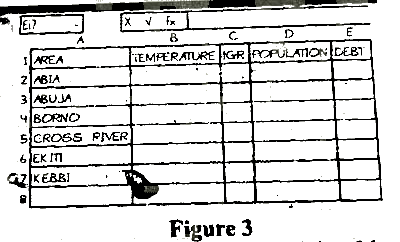
To add a new column to the right of the IGR column on the interface in the figure above, the user would.
right click on cell Cl snf thrn click on insert
right click on cell Dl and then click on user
right click on column C and then click on insert
right click on column D and the click on user
설명
Right-click on the column to the RIGHT of where you want the new column to be inserted, which is column D in this case and then click on insert.