
WAEC - Data Processing (2023 - No. 28)
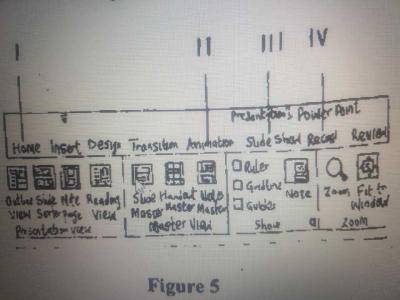
Figure 5 is an MS PowerPoint application interface. The part used to apply motion effect to different objects of a slide is labelled
III
I
II
IV
説明
The part used to apply motion effects to different objects of a slide in PowerPoint is "Animation". Animation effects in MS PowerPoint allow users to add movement, entrance, exit, and emphasis to individual objects on a slide. These effects help make presentation more dynamic and engaging.