
WAEC - Data Processing (2023 - No. 10)
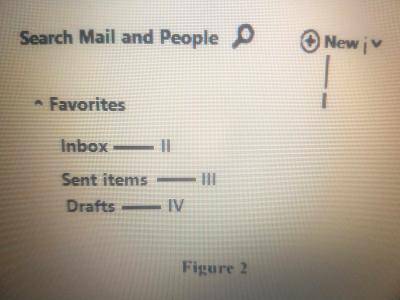
Figure 2 is an email application interface. Use it to answer questions 15 and 16.
To send an e-mail, the user must click on the part labelled
IV
I
II
III
स्पष्टीकरण
To send an e-mail, the user typically clicks on the "New" part of the email application interface. This option allows the user to compose a new email message and enter the recipient's email address, subject, and content before sending it. The "New" button or option is used to initiate the process of creating a new email to be sent.